Introduction
An array is an indexed collection of fixed number of homogeneous data elements. Alternatively, it represents a group of elements of the same data type. The primary advantage of arrays is that we can represent a large number of elements using a single variable, improving code readability.
Limitations of Arrays
- Arrays are fixed in size. Once created, the size cannot be increased or decreased dynamically.
- Arrays can hold only homogeneous data elements.
- Arrays lack ready-made method support because they are not implemented using any data structure.
Examples of Arrays
// Fixed-size array of Students
Student[] s = new Student[10000];
s[0] = new Student();   // Valid
s[1] = new Customer();  // Compile-time error

// Error Output:
Test.java:7: cannot find symbol
Symbol: class Customer
Location: class Test
s[1] = new Customer();
Using Object Arrays to Address Homogeneity Issue
We can use an Object[] array to hold heterogeneous elements:
Object[] o = new Object[10000];
o[0] = new Student();    // Valid
o[1] = new Customer();   // Valid
Introduction to Collections
Collections in Java overcome the limitations of arrays by being growable in nature and providing support for both homogeneous and heterogeneous data. They are implemented based on standard data structures and come with ready-made methods for common operations.
Advantages of Collections
- Growable: Collections can dynamically increase or decrease in size as per requirements.
- Memory Efficient: More suitable for memory management than arrays.
- Homogeneous and Heterogeneous: Can hold both types of data elements.
- Ready-Made Methods: Collections offer standard methods for operations, simplifying development.
Differences Between Arrays and Collections
| Feature | Arrays | Collections |
|---|---|---|
| Size | Fixed | Growable |
| Memory Usage | Not memory-efficient | Highly memory-efficient |
| Performance | Better performance | Relatively slower |
| Data Type | Homogeneous only | Both homogeneous and heterogeneous |
| Underlying Data Structure | None | Implemented based on standard data structures |
| Primitive Type Support | Supports both primitives and objects | Supports only objects |
Conclusion
While arrays are more performant and simpler for small, fixed-size homogeneous data, collections are versatile, memory-efficient, and developer-friendly for dynamic and mixed-type data requirements.
Java Collection Framework
The Collection Framework in Java provides a standardized way to represent and manipulate groups of objects as a single entity. It offers various classes and interfaces to make working with collections easier and more efficient.
1. What is a Collection?
If we want to represent a group of objects as a single entity, we use a collection. It is a container for storing, managing, and processing objects.
2. Java Collection Framework
The Collection Framework defines several classes and interfaces to represent a group of objects as a single entity. It is analogous to the STL (Standard Template Library) in C++.
| Java | C++ |
|---|---|
| Collection | Containers |
| Collection Framework | STL (Standard Template Library) |
3. Key Interfaces of the Collection Framework
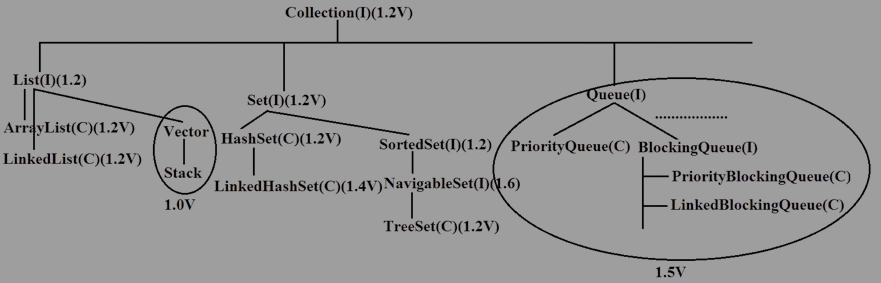
The Collection Framework consists of 9 key interfaces that define the structure and behavior of collections in Java:
- Collection: The root interface for representing a group of objects.
- List: An ordered collection that allows duplicates (e.g., ArrayList, LinkedList).
- Set: A collection that does not allow duplicates (e.g., HashSet, LinkedHashSet).
- SortedSet: A Set that maintains elements in a sorted order (e.g., TreeSet).
- NavigableSet: A SortedSet with additional navigation methods (e.g., TreeSet).
- Queue: A collection that operates in a FIFO (First-In-First-Out) manner (e.g., LinkedList, PriorityQueue).
- Map: A collection for storing key-value pairs (e.g., HashMap, LinkedHashMap).
- SortedMap: A Map that maintains keys in a sorted order (e.g., TreeMap).
- NavigableMap: A SortedMap with navigation methods (e.g., TreeMap).
Java Collection Framework
The Java Collection Framework provides interfaces and classes to represent and manipulate groups of objects as single entities.
1. Collection
The Collection interface is considered the root interface of the entire collection framework. It defines the most common methods applicable to any collection object.
- If we want to represent a group of "individual objects" as a single entity, we should use a collection.
- No concrete class implements the
Collectioninterface directly.
- Child Interfaces: List, Set, Queue
2. List
The List interface is a child of the Collection interface. It is used to represent a group of objects where:
- Duplicates are allowed.
- Insertion order is preserved.
- Child Classes: ArrayList, LinkedList, Vector, Stack
3. Set
The Set interface is a child of the Collection interface. It is used to represent a group of objects where:
- Duplicates are not allowed.
- Insertion order is not preserved.
- Child Classes: HashSet, LinkedHashSet
4. SortedSet
The SortedSet interface is a child of the Set interface. It is used to represent a group of unique objects arranged in a sorted order.
- Child Classes: TreeSet
5. NavigableSet
The NavigableSet interface is a child of the SortedSet interface. It provides several methods for navigation purposes, such as:
lower(),higher()floor(),ceiling()
- Child Classes: TreeSet
6. Queue
The Queue interface is a child of the Collection interface. It is used to represent a group of objects prior to processing. The common behavior of a queue is FIFO (First In, First Out).
- Child Classes: LinkedList, PriorityQueue, ArrayDeque
7. Map
The Map interface is used to represent a group of objects as key-value pairs.
Key points:
- Keys must be unique, but values can be duplicated.
- The Map interface is not a child of the Collection interface.
- Child Classes: HashMap, LinkedHashMap, Hashtable, TreeMap
8. SortedMap
The SortedMap interface is a child of the Map interface. It is used to represent a group of key-value pairs sorted by keys.
- Child Classes: TreeMap
9. NavigableMap
The NavigableMap interface is a child of the SortedMap interface. It provides navigation methods, such as:
lowerKey(),higherKey()descendingMap()
- Child Classes: TreeMap
Java Collection Framework: Key Differences
1. Differences Between Collection and Map
| Aspect | Collection | Map |
|---|---|---|
| Definition | Represents a group of individual objects as a single entity. | Represents a group of key-value pairs. |
| Hierarchy | Rooted at the Collection interface. |
Not part of the Collection hierarchy. |
| Duplicates | May or may not allow duplicates (depending on implementation). | Does not allow duplicate keys; values can be duplicated. |
| Ordering | Depends on the specific implementation (e.g., List preserves insertion order). |
Keys can be ordered if using SortedMap or TreeMap. |
| Examples | List, Set, Queue |
HashMap, TreeMap, LinkedHashMap |
2. Differences Between List, Set, and Queue
| Aspect | List | Set | Queue |
|---|---|---|---|
| Definition | Represents a group of objects where duplicates are allowed, and insertion order is preserved. | Represents a group of unique objects with no duplicates allowed. | Represents a group of objects arranged in the order of processing. |
| Duplicates | Allowed. | Not allowed. | Allowed, depending on the implementation. |
| Order | Insertion order is preserved. | Order is not preserved (except in LinkedHashSet). |
Order depends on the queue type (e.g., FIFO for Queue, priority order for PriorityQueue). |
| Key Methods | add(), get(), remove(), indexOf() |
add(), remove(), contains() |
offer(), poll(), peek() |
| Examples | ArrayList, LinkedList, Vector, Stack |
HashSet, LinkedHashSet, TreeSet |
LinkedList, PriorityQueue, ArrayDeque |
List Implementations in Java
The Java List interface represents an ordered collection (also known as a sequence). It allows duplicate elements and provides methods to access elements by their position in the list. Below are descriptions of key list implementations in Java:
1. ArrayList
The ArrayList class uses a dynamic array to store the elements. It is part of the java.util package and implements the List interface. It allows duplicates, preserves insertion order, and allows null values.
- Data Structure: Resizable array.
- Allows Duplicates: Yes.
- Preserves Insertion Order: Yes.
- Allows Null Insertion: Yes.
- Supports Heterogeneous Data: Yes.
- Best Choice For: Retrieval operations (due to fast access using index).
- Not Ideal For: Frequent modifications (insertion and removal in the middle of the list).
Example: ArrayList
  import java.util.ArrayList;

  public class ArrayListExample {
      public static void main(String[] args) {
          ArrayList list = new ArrayList<>();
          list.add("Apple");
          list.add("Banana");
          list.add("Cherry");

          // Displaying elements
          for (String fruit : list) {
              System.out.println(fruit);
          }
      }
  }
2. LinkedList
The LinkedList class uses a doubly linked list to store elements. It implements both the List and Deque interfaces. It allows duplicates, preserves insertion order, and allows null values.
- Data Structure: Doubly linked list.
- Allows Duplicates: Yes.
- Preserves Insertion Order: Yes.
- Allows Null Insertion: Yes.
- Supports Heterogeneous Data: Yes.
- Best Choice For: Frequent modifications (insertion and deletion) as linked lists offer constant time insertions and deletions.
- Not Ideal For: Frequent retrieval (no fast indexing).
Example: LinkedList
  import java.util.LinkedList;

  public class LinkedListExample {
      public static void main(String[] args) {
          LinkedList list = new LinkedList<>();
          list.add("Apple");
          list.add("Banana");
          list.add("Cherry");

          // Displaying elements
          for (String fruit : list) {
              System.out.println(fruit);
          }
      }
  }
3. Vector
The Vector class is similar to ArrayList but with synchronized methods. It is a legacy class in the java.util package and also implements the List interface. Vectors are thread-safe but tend to have performance issues due to synchronization.
- Data Structure: Resizable array.
- Allows Duplicates: Yes.
- Preserves Insertion Order: Yes.
- Allows Null Insertion: Yes.
- Supports Heterogeneous Data: Yes.
- Best Choice For: Retrieval operations (fast access), but not ideal for frequent modifications due to synchronization overhead.
- Not Ideal For: Frequent modifications due to lower performance.
Example: Vector
  import java.util.Vector;

  public class VectorExample {
      public static void main(String[] args) {
          Vector vector = new Vector<>();
          vector.add("Apple");
          vector.add("Banana");
          vector.add("Cherry");

          // Displaying elements
          for (String fruit : vector) {
              System.out.println(fruit);
          }
      }
  }
4. Stack
The Stack class represents a last-in, first-out (LIFO) stack of objects. It extends Vector and provides methods like push(), pop(), peek(), and empty() for stack operations. Like Vector, it is synchronized.
- Data Structure: Stack (LIFO).
- Allows Duplicates: Yes.
- Preserves Insertion Order: Yes (but works on LIFO principle).
- Allows Null Insertion: Yes.
- Supports Heterogeneous Data: Yes.
- Best Choice For: Stack operations (LIFO structure).
- Not Ideal For: Frequent modifications or general use as a list.
Example: Stack
  import java.util.Stack;

  public class StackExample {
      public static void main(String[] args) {
          Stack stack = new Stack<>();
          stack.push("Apple");
          stack.push("Banana");
          stack.push("Cherry");

          // Displaying elements using LIFO order
          while (!stack.isEmpty()) {
              System.out.println(stack.pop());
          }
      }
  }
Differences Between List Implementations
Differences Between List Implementations
| Feature | ArrayList | Vector | LinkedList | Stack |
|---|---|---|---|---|
| Data Structure | Resizable Array | Resizable Array | Doubly Linked List | Stack (LIFO) |
| Allows Duplicates | Yes | Yes | Yes | Yes |
| Insertion Order | Yes | Yes | Yes | Yes |
| Null Insertion | Yes | Yes | Yes | Yes |
| Supports Heterogeneous Data | Yes | Yes | Yes | Yes |
| Best For | Retrieval Operations | Retrieval Operations | Frequent Modifications | Last-In-First-Out Operations |
| Thread-Safety | No | Yes (but slower) | No | Yes (but slower) |
| Legacy Class | No | Yes | No | Yes |
Difference Between ArrayList and Vector
| Aspect | ArrayList | Vector |
|---|---|---|
| Data Structure | Resizable array | Resizable array |
| Thread Safety | Not synchronized | Synchronized (thread-safe) |
| Performance | Faster for most operations | Slower due to synchronization overhead |
| Growth Factor | Increases by 50% when full | Increases by doubling its size when full |
Difference Between ArrayList and LinkedList
| Aspect | ArrayList | LinkedList |
|---|---|---|
| Data Structure | Resizable array | Doubly linked list |
| Insertion/Deletion | Slower (due to shifting elements) | Faster (due to linked list structure) |
| Access Time | Faster (random access with index) | Slower (no index-based access) |
| Memory Consumption | Less memory overhead | More memory overhead due to node pointers |
Set Implementations in Java
The Java Set interface represents a collection of unique elements. It does not allow duplicate elements and provides methods for accessing elements, but does not guarantee order. The following are key `Set` implementations in Java:
1. HashSet
The HashSet class uses a hash table for storage. It does not allow duplicates, and the insertion order is not preserved. It allows null insertion and supports heterogeneous data types.
- Data Structure: Hash Table
- Does Not Allow Duplicates: Yes
- Preserves Insertion Order: No
- Allows Null Insertion: Yes
- Supports Heterogeneous Data: Yes
- Best For: When the collection needs to ensure uniqueness but the order does not matter.
Example: HashSet
  import java.util.HashSet;

  public class HashSetExample {
      public static void main(String[] args) {
          HashSet set = new HashSet<>();
          set.add("Apple");
          set.add("Banana");
          set.add("Cherry");

          // Displaying elements
          for (String fruit : set) {
              System.out.println(fruit);
          }
      }
  }
2. LinkedHashSet
The LinkedHashSet class is similar to HashSet, but it also maintains a doubly linked list of elements to preserve the insertion order. It does not allow duplicates and allows null insertion, and it supports heterogeneous data types.
- Data Structure: Hash Table + Doubly Linked List
- Does Not Allow Duplicates: Yes
- Preserves Insertion Order: Yes
- Allows Null Insertion: Yes
- Supports Heterogeneous Data: Yes
- Best For: When the collection needs to ensure uniqueness and preserve insertion order.
Example: LinkedHashSet
  import java.util.LinkedHashSet;

  public class LinkedHashSetExample {
      public static void main(String[] args) {
          LinkedHashSet set = new LinkedHashSet<>();
          set.add("Apple");
          set.add("Banana");
          set.add("Cherry");

          // Displaying elements
          for (String fruit : set) {
              System.out.println(fruit);
          }
      }
  }
3. TreeSet
The TreeSet class implements the Set interface using a balanced tree. It does not allow duplicates and preserves elements according to a natural order or a custom comparator. However, it does not allow null insertion and supports only homogeneous data types (all elements must be of the same type).
- Data Structure: Balanced Tree
- Does Not Allow Duplicates: Yes
- Preserves Insertion Order: No (preserves sorting order)
- Allows Null Insertion: No
- Supports Heterogeneous Data: No
- Best For: When elements need to be sorted and uniqueness is required.
Example: TreeSet
  import java.util.TreeSet;

  public class TreeSetExample {
      public static void main(String[] args) {
          TreeSet set = new TreeSet<>();
          set.add("Apple");
          set.add("Banana");
          set.add("Cherry");

          // Displaying elements
          for (String fruit : set) {
              System.out.println(fruit);
          }
      }
  }
Differences Between Set Implementations
Difference Between HashSet, LinkedHashSet, and TreeSet
| Aspect | HashSet | LinkedHashSet | TreeSet |
|---|---|---|---|
| Data Structure | Hash Table | Hash Table + Doubly Linked List | Balanced Tree |
| Duplicates | Does not allow duplicates | Does not allow duplicates | Does not allow duplicates |
| Insertion Order | Not preserved | Preserved | Not preserved (sorted order) |
| Null Insertion | Allowed | Allowed | Not allowed |
| Supports Heterogeneous Data | Yes | Yes | No (Homogeneous data only) |
| Sorting Order | Not sorted | Not sorted | Sorted by natural order or custom comparator |
| Best For | When insertion order doesn't matter and fast operations are required | When insertion order needs to be preserved | When sorted order is required for elements |
Queue Implementations in Java
The Queue interface in Java represents a collection designed for holding elements prior to processing. It follows the First-In-First-Out (FIFO) principle. Here are some key queue implementations in Java:
1. Queue
The Queue interface represents a collection of elements, where elements are processed in a FIFO order. It is part of the java.util package and provides methods such as offer(), poll(), and peek().
- Data Structure: FIFO (First-In-First-Out)
- Allows Duplicates: Yes
- Preserves Insertion Order: Yes
- Null Insertion: Yes (depends on the specific implementation)
- Best For: When elements need to be processed in the order they were added.
2. PriorityQueue
The PriorityQueue class implements the Queue interface and orders elements based on their natural order or according to a specified comparator. It does not guarantee FIFO order, as elements are dequeued in priority order rather than the order of insertion.
- Data Structure: Binary Heap (for priority ordering)
- Does Not Allow Duplicates: No (duplicates are allowed)
- Preserves Insertion Order: No (elements are ordered by priority)
- Null Insertion: No
- Best For: When elements need to be processed based on priority rather than insertion order.
Example: PriorityQueue
  import java.util.PriorityQueue;

  public class PriorityQueueExample {
      public static void main(String[] args) {
          PriorityQueue queue = new PriorityQueue<>();
          queue.add(10);
          queue.add(5);
          queue.add(20);

          // Displaying elements (will display in order of priority)
          while (!queue.isEmpty()) {
              System.out.println(queue.poll());
          }
      }
  }
3. LinkedList
The LinkedList class implements the Queue interface as well, and it provides a doubly linked list-based implementation. It maintains the FIFO order for processing elements and allows for both efficient insertion and removal from both ends.
- Data Structure: Doubly Linked List
- Allows Duplicates: Yes
- Preserves Insertion Order: Yes
- Null Insertion: Yes
- Best For: When elements need to be processed in the order they were added, with efficient removal and insertion from both ends of the queue.
Example: LinkedList as Queue
  import java.util.LinkedList;
  import java.util.Queue;

  public class LinkedListQueueExample {
      public static void main(String[] args) {
          Queue queue = new LinkedList<>();
          queue.offer("Apple");
          queue.offer("Banana");
          queue.offer("Cherry");

          // Displaying elements (FIFO order)
          while (!queue.isEmpty()) {
              System.out.println(queue.poll());
          }
      }
  }
Differences Between Queue Implementations
Difference Between PriorityQueue and LinkedList
| Aspect | PriorityQueue | LinkedList |
|---|---|---|
| Data Structure | Binary Heap (Priority-based ordering) | Doubly Linked List (FIFO order) |
| Preserves Insertion Order | No (ordered by priority) | Yes (FIFO order) |
| Null Insertion | No | Yes |
| Element Removal | Based on priority | FIFO order (from the head) |
| Best For | Priority-based processing | FIFO processing, efficient insertion and removal from both ends |
Map Implementations in Java
The Map interface in Java represents a collection of key-value pairs, where each key is unique. Unlike other collections like List or Set, a Map allows the storage of data in the form of key-value associations. Below are some key implementations of the Map interface in Java:
1. Map
The Map interface represents a collection of key-value pairs where each key maps to exactly one value. It allows fast lookups, updates, and deletions of key-value pairs. While duplicate keys are not allowed, duplicate values are permitted.
- Data Structure: Varies by implementation (e.g., hash table, tree, etc.)
- Allows Duplicates: No (for keys)
- Preserves Insertion Order: Depends on the implementation
- Null Insertion: Yes (depends on the implementation)
- Best For: Storing key-value pairs with fast retrieval based on keys.
2. HashMap
The HashMap class implements the Map interface using a hash table. It provides constant-time performance for most operations (insertion, deletion, retrieval) assuming the hash function distributes the elements properly.
- Data Structure: Hash Table
- Does Not Allow Duplicate Keys: Yes, but values can be duplicated
- Preserves Insertion Order: No
- Null Insertion: Yes (allows one null key and multiple null values)
- Supports Heterogeneous Data: Yes (for both keys and values)
Example: HashMap
  import java.util.HashMap;

  public class HashMapExample {
      public static void main(String[] args) {
          HashMap map = new HashMap<>();
          map.put(1, "Apple");
          map.put(2, "Banana");
          map.put(3, "Cherry");

          // Displaying key-value pairs
          map.forEach((key, value) -> System.out.println(key + ": " + value));
      }
  }
3. LinkedHashMap
The LinkedHashMap class extends HashMap and maintains the insertion order of key-value pairs. It uses a doubly linked list to maintain the order in which elements were inserted, while still providing the fast lookup performance of a hash table.
- Data Structure: Hash Table + Doubly Linked List
- Does Not Allow Duplicate Keys: Yes, but values can be duplicated
- Preserves Insertion Order: Yes
- Null Insertion: Yes (allows one null key and multiple null values)
- Supports Heterogeneous Data: Yes (for both keys and values)
Example: LinkedHashMap
  import java.util.LinkedHashMap;

  public class LinkedHashMapExample {
      public static void main(String[] args) {
          LinkedHashMap map = new LinkedHashMap<>();
          map.put(1, "Apple");
          map.put(2, "Banana");
          map.put(3, "Cherry");

          // Displaying key-value pairs (insertion order is preserved)
          map.forEach((key, value) -> System.out.println(key + ": " + value));
      }
  }
4. TreeMap
The TreeMap class implements the Map interface using a Red-Black tree. It orders the key-value pairs based on the natural ordering of the keys, or a specified comparator, and does not allow duplicate keys. TreeMap does not allow null keys, and only supports homogeneous data for keys.
- Data Structure: Red-Black Tree
- Does Not Allow Duplicate Keys: Yes, but values can be duplicated
- Preserves Insertion Order: No (ordered by key)
- Null Insertion: No (keys cannot be null)
- Supports Heterogeneous Data: No (supports only homogeneous data for keys)
Example: TreeMap
  import java.util.TreeMap;

  public class TreeMapExample {
      public static void main(String[] args) {
          TreeMap map = new TreeMap<>();
          map.put(3, "Apple");
          map.put(1, "Banana");
          map.put(2, "Cherry");

          // Displaying key-value pairs (sorted by key)
          map.forEach((key, value) -> System.out.println(key + ": " + value));
      }
  }
Differences Between Map Implementations
Difference Between HashMap, LinkedHashMap, and TreeMap
| Aspect | HashMap | LinkedHashMap | TreeMap |
|---|---|---|---|
| Data Structure | Hash Table | Hash Table + Doubly Linked List | Red-Black Tree |
| Preserves Insertion Order | No | Yes | No (sorted by key) |
| Null Insertion | Yes (one null key, multiple null values) | Yes (one null key, multiple null values) | No (keys cannot be null) |
| Sorting of Keys | No sorting | No sorting (preserves insertion order) | Sorted by natural order or custom comparator |
| Supports Heterogeneous Data | Yes (for both keys and values) | Yes (for both keys and values) | No (supports only homogeneous data for keys) |
| Best For | Fast lookups and updates with no ordering guarantee | Preserving insertion order with fast lookups | Automatic sorting of keys (natural or custom) |
Hash Tables, Dictionaries, and Properties in Java
In Java, hash-based data structures such as HashTable, Dictionary, and Properties are used to store key-value pairs efficiently. Here's a detailed explanation:
1. HashTable
HashTable is a synchronized implementation of a hash table that maps keys to values.
- Allows null values but does not allow
nullkeys. - Thread-safe as it is synchronized.
- Extends the
Dictionaryclass.
Example: Using HashTable
  import java.util.Hashtable;

  public class HashTableExample {
      public static void main(String[] args) {
          Hashtable table = new Hashtable<>();
          table.put(1, "Apple");
          table.put(2, "Banana");
          table.put(3, "Cherry");

          System.out.println("HashTable: " + table);
          System.out.println("Value for key 2: " + table.get(2));
      }
  }
2. Dictionary
Dictionary is an abstract class that represents a key-value pair data structure. It is the parent class of HashTable.
- It is an older class and is rarely used directly.
- Provides methods like
put(),get(), andremove().
Example: Using Dictionary
  import java.util.Dictionary;
  import java.util.Hashtable;

  public class DictionaryExample {
      public static void main(String[] args) {
          Dictionary dictionary = new Hashtable<>();
          dictionary.put(1, "Alice");
          dictionary.put(2, "Bob");
          dictionary.put(3, "Charlie");

          System.out.println("Dictionary: " + dictionary);
          System.out.println("Value for key 1: " + dictionary.get(1));
      }
  }
3. Properties
Properties is a subclass of Hashtable that is used to maintain a list of key-value pairs, where both the key and the value are strings. It is often used for configuration purposes.
- Supports reading and writing to files using
load()andstore()methods. - Widely used for configuration files in Java applications.
Example: Using Properties
  import java.io.FileOutputStream;
  import java.io.IOException;
  import java.util.Properties;

  public class PropertiesExample {
      public static void main(String[] args) {
          Properties properties = new Properties();
          properties.setProperty("username", "admin");
          properties.setProperty("password", "12345");

          System.out.println("Properties: " + properties);

          try (FileOutputStream fos = new FileOutputStream("config.properties")) {
              properties.store(fos, "Configuration Settings");
              System.out.println("Properties saved to file.");
          } catch (IOException e) {
              e.printStackTrace();
          }
      }
  }
Loading Properties from a File
  import java.io.FileInputStream;
  import java.io.IOException;
  import java.util.Properties;

  public class LoadPropertiesExample {
      public static void main(String[] args) {
          Properties properties = new Properties();
          try (FileInputStream fis = new FileInputStream("config.properties")) {
              properties.load(fis);
              System.out.println("Properties loaded: " + properties);
          } catch (IOException e) {
              e.printStackTrace();
          }
      }
  }
Comparison: HashTable vs HashMap
Both HashTable and HashMap are implementations of the Map interface in Java, but they have significant differences. Here's a detailed comparison:
| Aspect | HashTable | HashMap |
|---|---|---|
| Synchronization | Thread-safe and synchronized. Multiple threads cannot access it simultaneously. | Not synchronized. It is faster but requires external synchronization for thread safety. |
| Null Keys and Values | Does not allow null keys or null values. |
Allows one null key and multiple null values. |
| Performance | Slower due to synchronization overhead. | Faster because it is not synchronized. |
| Legacy vs Modern | Part of the older java.util legacy classes. |
Introduced in Java 1.2 as part of the modern java.util collections framework. |
| Usage in Concurrent Environments | Suitable for multithreaded environments due to built-in synchronization. | Requires explicit synchronization or use of Collections.synchronizedMap() for multithreaded environments. |
| Default Capacity | 11 (resized by multiplying capacity by 2 and adding 1). | 16 (resized by doubling the capacity). |